Wall Calendar 2026–2028: A Practical InDesign Template for Professionals and Creators
Planning ahead has become second nature to anyone balancing multiple responsibilities. Whether you're coordinating a team, managing content deadlines, or simply keeping your household on track, a well-designed wall calendar can quietly transform how you organize your time. The Wall Calendar 2026-2028 is one such tool — a professionally crafted Adobe InDesign template that spans three full years and adapts to whatever workflow you throw at it. This article walks through what this template offers, who can benefit most from it, and how to get the most out of its features.
What Makes This Calendar Template Stand Out
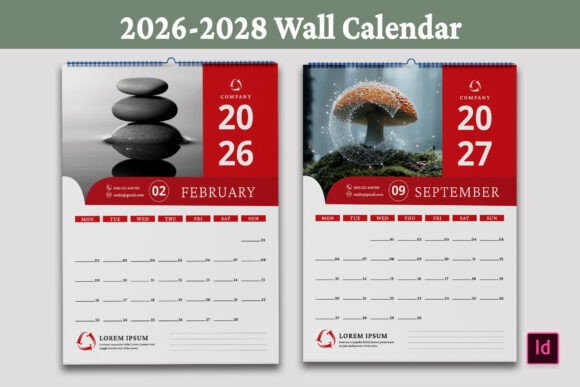
Created in Adobe InDesign, this template delivers a clean, modern layout that avoids visual clutter while keeping all essential information front and center. Each month occupies its own spread, with clearly defined grids and generous space for jotting down appointments, reminders, or milestones. The design follows a Monday-start week format, which aligns with standard business and international scheduling preferences.
At its core, this is a print-ready file. The specifications include A4 size (8.27 x 11.69 inches), CMYK color mode, a 0.125-inch bleed, and 36 pages. Every element has been prepared with professional output in mind, meaning you can send it to a commercial printer or run it on a high-quality home printer with predictable results. For anyone who has dealt with misaligned grids or color shifts at the last minute, this level of preparation saves real time and frustration.
Key Characteristics Worth Noting
The template comes in multiple file formats — INDD, IDML, PDF, and printable JPEG — so you are not locked into a single workflow. The INDD file works with Adobe InDesign CC and also supports CS4 through the IDML document. This backward compatibility is a practical advantage if you collaborate with designers or print shops using older software versions.
Free fonts are used throughout, and a download link is included in the main file. That eliminates the headache of tracking down expensive typefaces or dealing with missing font errors when opening the template. The file structure is organized logically, making it straightforward to swap images, adjust colors, or modify text without digging through layers of messy code.
High resolution is a given here. The grids, typography, and spacing hold up under close inspection, which matters when the calendar hangs on a wall where people see it daily. A crisp, readable design communicates professionalism and care — whether in a startup office, a school hallway, or a home workspace.
Personal Use and Home Organization
For individuals managing family schedules, the Wall Calendar 2026-2028 provides a central place to track school holidays, medical appointments, birthdays, and household tasks. The monthly view gives enough room to write in multiple entries per day without feeling cramped. Adding personal photos to customize each month also turns the calendar into a year-round visual keepsake — a small touch that makes checking the schedule feel less like a chore.
Business and Office Environments
Small business owners and office managers often need a planning tool that works for the whole team. This template supports that use case nicely. You can brand each page with company colors and logos, mark project milestones, highlight deadlines, or map out quarterly goals. Because it covers three years (2026 through 2028), you can plan long-term initiatives without flipping between separate annual calendars. The clean grid layout also works well for meeting scheduling, shift planning, or content publishing calendars.
Educational Settings and Training Spaces
Teachers, trainers, and academic coordinators can adapt the template for classroom planning. Mark semester start and end dates, exam periods, holidays, and assignment due dates. The spacious cells allow you to write in daily lesson topics or special events. Printing a large-format version for a staff room wall or a smaller A4 version for individual desks is straightforward thanks to the print-ready setup.
Creative and Freelance Professionals
Designers, photographers, illustrators, and content creators often look for templates that are both functional and visually flexible. This calendar allows you to rotate in your own imagery — product shots, portfolio pieces, seasonal photography, or brand visuals — turning each month into a mini showcase. The editable InDesign file gives you full control over typography, color palettes, and layout details. For freelancers who produce client gifts or branded promotional materials, this template can be customized and printed in small batches without needing extensive design resources.
Commercial and Marketing Use
Businesses looking for a thoughtful client gift or a promotional item with staying power will find this template practical. Because it covers three years, recipients are likely to keep it visible much longer than a single-year calendar. Branding elements can be integrated directly into the design — company logos, taglines, contact information, or even QR codes linking to services. The professional finish reinforces brand credibility every time someone looks at the date.
Usability and Efficiency Benefits
Having everything in one organized file saves you from piecing together separate assets or rebuilding layouts from scratch. The template includes 36 pages with consistent formatting, so you don't need to manually align each month's grid. If you need to tweak the start day, adjust margins, or change font sizes, the InDesign file lets you make global adjustments quickly.
The inclusion of both editable source files and printable outputs means you can work at your own pace. Make revisions in INDD, save a high-res PDF for commercial printing, or export JPEG versions for digital previews. This flexibility supports both collaborative workflows and solo projects.
For users who may not be deeply experienced with InDesign, the template is structured to be easy to navigate. Layers are clearly named, text frames are unlocked, and image placeholders are labeled. The free font download link removes one more potential barrier to getting started.
Considerations When Choosing a Calendar Template
Before diving into customization, think about where and how the final calendar will be used. If it's going in a high-traffic area, consider whether the text size and grid spacing allow for comfortable daily reading. The A4 size offers a good balance — large enough to be readable from a short distance, but not so oversized that it overwhelms a standard wall space.
Print quality depends partly on the printer and paper stock you choose. The CMYK print-ready file is optimized for commercial offset or digital printing, but you can also print on a quality home inkjet or laser printer using the PDF. If you plan to write on the calendar with pen or marker, a heavier matte paper will perform better than glossy stock.
Think about how much customization you actually need. The template gives you room to change almost everything — images, colors, fonts, and layout elements — but even small tweaks like swapping in a personal photo or shifting the accent color can make the design feel unique. Start with minor adjustments if you're new to InDesign, then explore deeper modifications as you get comfortable.
Also consider the three-year span. A 2026–2028 calendar is a planning tool that encourages longer-term thinking. It works well for goal setting, project roadmaps, and tracking annual patterns. If your planning cycle aligns with a multi-year horizon, this format is a natural fit.
Practical Recommendations for Getting Started
Open the INDD file in Adobe InDesign and review the layer structure first. Familiarize yourself with where the grids, text, and image placeholders live. Replace the placeholder images with your own high-resolution photos or graphics. Adjust the color scheme using swatches to match a brand palette or personal preference. Update the text fields for holidays, events, or notes. Once everything looks right, export a print-ready PDF with the included bleed and crop marks.
If you plan to make multiple copies — for a team, a client list, or a retail batch — keep the master INDD file untouched and use copies for each variation. This preserves the original structure and makes it easy to produce consistent results year after year.
For those who prefer quick results, the included PDF can be printed directly after adding only minor customizations. The JPEG files offer even more simplicity for digital-only use, such as displaying on a tablet, smart display, or sharing as a downloadable file.
Who Will Find This Template Most Valuable
This wall calendar template suits anyone who values clean design, print-ready preparation, and the freedom to personalize. Small business owners looking for branded office tools will appreciate the professional finish. Freelance designers and content creators will enjoy the creative control and file compatibility. Educators and coordinators will find the structure reliable for long-term planning. And anyone simply wanting a beautiful, functional wall calendar for home will have a solid foundation to work from.
The combination of three-year coverage, A4 format, Monday-start weeks, and full editability makes this template versatile enough for diverse real-world applications. Whether you're printing one copy for your own wall or producing a batch for commercial use, the design holds up under real daily use.
Ultimately, a good calendar does more than mark dates — it helps you move through the year with intention and clarity. The Wall Calendar 2026-2028 provides a flexible, high-quality framework for exactly that purpose. With the included file formats, free fonts, and clear organization, the path from template to finished wall calendar is straightforward and rewarding. Take advantage of the editable elements to make it your own, and enjoy the peace of mind that comes with a well-planned year — or three.