Professional Calendar Templates for Long-Term Planning and Print Production
Managing time across multiple years requires more than a simple grid of dates. For professionals who oversee editorial calendars, marketing timelines, project schedules, or content pipelines, a well-structured yearly overview becomes an operational necessity. The Professional Calendar Templates set, covering 2026 through 2030, offers a print-ready solution built around Adobe InDesign workflows. This article examines what these templates provide, how they perform in real production environments, and which users will benefit most from their structure.
What the Professional Calendar Templates Package Includes
This template collection delivers five pages of yearly overview calendars, each formatted for A4 size (8.27 × 11.69 inches) with full CMYK print readiness. The package supports multiple file formats: INDD and IDML for InDesign users, a printable JPEG for quick output, and a PDF for sharing or proofing. A 0.125-inch bleed ensures that printed materials extend cleanly to the edge of the page after trimming. The templates use free fonts, with download links included in the main file, so there is no additional licensing cost or font acquisition hurdle.
The editable InDesign file marks each year as a separate page, giving users a dedicated spread for 2026, 2027, 2028, 2029, and 2030. Because the templates are fully customizable, you can adjust colors, typefaces, spacing, and layout elements without rebuilding the document from scratch. The IDML format also ensures backward compatibility with older versions of Adobe InDesign, including CS4, which remains relevant for users who have not upgraded to the latest Creative Cloud release.
Usability and Workflow Integration
A template is only as valuable as the friction it removes from your production process. The Professional Calendar Templates set minimizes setup time by providing a pre-structured document with proper margins, bleeds, and color settings already configured. For anyone who regularly produces printed planners, desk calendars, or annual schedules, this eliminates the repetitive groundwork of establishing document specifications for each new year.
The editing experience within InDesign is straightforward. Each page contains clearly defined text layers and date grids, so modifying entries, swapping colors, or repositioning elements requires minimal effort. Users familiar with InDesign’s layers panel and character styles will find the file well organized. The free fonts referenced in the download are readily available through the provided link, and once installed, the template renders exactly as intended.
One practical advantage is the ability to batch edit across all five years. Because the same base layout repeats each year, you can apply global formatting changes to maintain consistent branding across the entire 2026–2030 span. This is particularly useful for organizations that distribute branded yearly calendars to clients, team members, or subscribers.
Print Readiness and Output Quality
Print-ready templates must meet commercial printing standards, and this set addresses that requirement directly. The CMYK color space, combined with the specified A4 dimensions and 0.125-inch bleed, aligns with common print service provider guidelines. Whether you output in-house using a high-quality laser printer or send the files to a commercial press, the document structure supports accurate color reproduction and proper trim margins.
The PDF output serves as a reliable proofing file. You can review the layout on screen, share it with stakeholders for approval, or send it directly to a printer without additional conversion steps. The JPEG version offers a quick preview or a low-resolution option for digital display, though for final print runs the PDF or the original INDD file will deliver the best results.
For users who produce physical calendars as part of a product line, the consistent formatting across five years creates a cohesive series. A customer who purchases a 2026 calendar will recognize the same layout in 2027, reinforcing brand continuity. This consistency matters for publishers, stationery designers, and small businesses that sell printed planners.
Flexibility and Customization Potential
The term “editable” can mean different things depending on the template. In this case, the InDesign file gives you control over nearly every visual element. You can replace the placeholder typography with your brand fonts, adjust the color palette to match seasonal themes, or add custom graphics such as logos, icons, or decorative borders. The grid structure remains intact, but the aesthetic direction is entirely up to you.
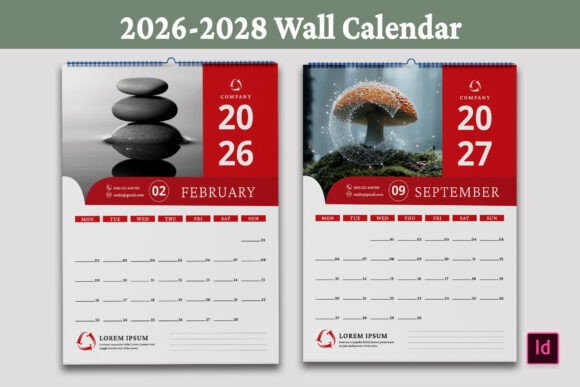
Because the templates are individual page files rather than a single merged layout, you can reorder years, combine them into a booklet, or separate them for single-year projects. This modular approach suits a range of output formats: wall calendars, desk pads, binder inserts, or digital planners exported as PDFs for tablet use.
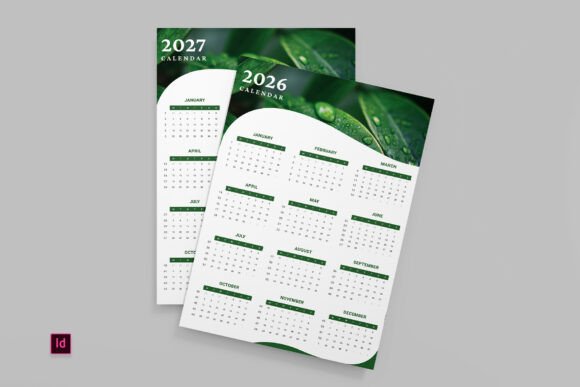
One limitation to consider is that the template is designed for yearly overview rather than monthly or weekly detail. Each page shows the full year at a glance, which is ideal for high-level planning but not for day-by-day scheduling. Users who need granular daily or weekly spreads will need to supplement this template with additional resources or create their own detail pages. Understanding this scope helps set appropriate expectations for what the template can and cannot do.
Who Benefits Most from This Template Set
The Professional Calendar Templates are best suited for individuals and teams who produce printed or digital yearly calendars as part of their professional output. The following groups will find particular value:
- Graphic designers and layout professionals who need a clean starting point for client calendar projects. The pre-set bleeds and CMYK settings reduce prepress errors.
- Small business owners and entrepreneurs who create branded calendars for customers or internal use. The five-year scope allows for long-term planning without redesigning each year from scratch.
- Publishers and content creators who produce editorial calendars for print or digital distribution. A yearly overview helps map content themes, publication dates, and marketing campaigns at a glance.
- Educators and academic planners who need a simple, printable yearly calendar for curriculum planning, term schedules, or administrative timelines.
- Freelancers and serious hobbyists who want a professional-looking calendar for personal organization or to offer as a free download or product on their website.
The template also works well for teams that maintain consistent visual branding across multiple years. Because the format remains the same, the calendar becomes a recognizable part of a brand’s printed collateral. A real estate agent, for example, might distribute yearly calendars to clients with company branding and key dates highlighted. A blogger might offer a free printable calendar as a lead magnet, reinforcing their brand identity with each download.
Real-World Performance and Practical Observations
In actual use, the templates perform reliably for their intended purpose. The page layout is spacious enough to write in date-specific notes or mark important milestones, provided the font size remains reasonable. The A4 format offers ample room for annotation when printed, and the clean grid structure prevents visual clutter.
One area where the template excels is in its compatibility with older InDesign versions. Many designers working in agencies or educational settings still use CS4 or CS5 due to budget constraints or institutional licensing. The inclusion of IDML ensures that these users can open and edit the file without needing to upgrade software. This broadens the template’s accessibility significantly.
On the other hand, users who work exclusively in non-Adobe software such as Affinity Publisher, QuarkXPress, or Canva will find the native InDesign format less accessible. While the PDF and JPEG files provide usable outputs, full customization requires InDesign. If your workflow does not include Adobe’s layout tools, this template may not fit seamlessly into your process unless you convert the files manually.
Another observation relates to the template’s minimal aesthetic. The design is intentionally clean and functional, which suits professional environments but may feel understated for users seeking elaborate decorative calendars. If your brand or project calls for illustrated themes, elaborate typography, or seasonal artwork, you will need to invest time in customizing the template to achieve that look. The foundation is solid, but the visual personality is yours to build.
Long-Term Value and Reusability
A template covering five years offers inherent long-term value if you produce calendars annually. You can reuse the same InDesign file each year by duplicating pages and updating the date grids. However, because the templates already include pages for 2026 through 2030, you have an immediate solution for the next half-decade without needing to create new files yearly.
The print-ready setup also means that reprints or updated versions require minimal rework. If a client requests a revised color scheme or a new logo placement, the changes apply across all years simultaneously if you use parent pages or layer styles. This efficiency saves time, especially for small teams juggling multiple projects.
The free fonts included with the template add to the long-term value. Because the fonts are free for commercial use, there are no licensing renewal fees or restrictions that might complicate redistribution. You can include the calendar files with client deliverables or sell printed versions without worrying about font licensing violations.
Practical Recommendations for Getting the Most Out of This Template
To maximize the usefulness of this template set, consider the following approach:
- Install the free fonts first. The linked fonts are essential for the template to render correctly. Install them before opening the INDD file to avoid missing font alerts.
- Review the bleed and margin settings before making any edits. Confirm that your printer or print service supports the 0.125-inch bleed standard. If they require a larger bleed, adjust the document settings early in the workflow.
- Create a master page for consistent branding. InDesign’s parent pages allow you to place logos, contact information, or recurring design elements once and apply them to all five yearly pages.
- Export a high-resolution PDF for final output. The PDF format preserves fonts, colors, and bleeds more reliably than JPEG, especially for commercial printing.
- Test print a single page before producing the full run. Verify alignment, color accuracy, and trim margins on your own printer or through a proof from your print provider.
If you plan to distribute the calendar digitally as a PDF or JPEG, consider reducing the file size for easier downloading. The print-ready resolution may produce larger files than necessary for on-screen viewing, so a separate export with optimized compression can improve the user experience.
Who Might Want to Look for an Alternative
While this template serves many professional use cases well, it is not a universal fit. Users who need monthly or weekly spreads for detailed scheduling will need to combine this with other resources or choose a more granular template. Similarly, individuals working exclusively in web-based design tools or non-Adobe software may find the InDesign-centric format limiting. For those who prefer a more decorative or themed aesthetic, the clean functional layout may feel too minimal without significant customization.
The template also assumes a certain level of familiarity with InDesign. Beginners who are new to the software may find the layers and styles intimidating, though the included documentation and the responsiveness of the designer (noted as “DESIGN ZONE” in the product details) can help bridge that gap. The offer of support indicates that the creator is available to assist with issues, which reduces the learning curve to some extent.
Final Assessment
The Professional Calendar Templates for 2026 through 2030 deliver a practical, print-ready foundation for anyone who produces yearly calendars using Adobe InDesign. The set covers five years, provides multiple file formats, includes proper print specifications, and offers the flexibility to customize branding and layout. It is especially valuable for designers, small businesses, educators, and content creators who need a reliable starting point for annual planning materials.
The template does not attempt to be everything to everyone. It focuses on the yearly overview format, which excels at high-level scheduling but does not replace detailed planning tools. Its reliance on InDesign may exclude users outside the Adobe ecosystem, but for those within it, the file structure is well organized and easy to edit. The inclusion of IDML for older software versions is a thoughtful touch that extends accessibility.
If your workflow involves InDesign and you need a clean, professional yearly calendar template that you can customize and print across multiple years, this set offers a solid return on investment. It removes the repetitive setup work, ensures print readiness, and gives you a consistent format that can evolve with your brand over time.