2026 Pinterest Planner KDP: A Practical Tool for Organized Content Strategy
If you are serious about building a sustainable Pinterest presence in 2026, you already know that success rarely comes from sporadic pinning or guesswork. The 2026 Pinterest Planner KDP is not just another printable—it is a structured framework that helps you plan, execute, and review your Pinterest strategy with clarity. Whether you are a small business owner, a content creator, a freelancer, or a publisher looking to expand your KDP catalog, this planner gives you a reusable system for managing the entire lifecycle of your Pinterest efforts.
What makes this planner distinct is how it combines strategic planning with operational tracking. You are not just filling in dates; you are building a repeatable workflow that connects your content ideas, keyword research, pin creation, and performance analysis. Because the templates are fully customizable in Canva, you can adapt every section to match your brand, niche, or audience without starting from scratch. Let us walk through what this planner contains, how it fits into a practical workflow, and how you can integrate it smoothly into your routine.
What the 2026 Pinterest Planner KDP Offers
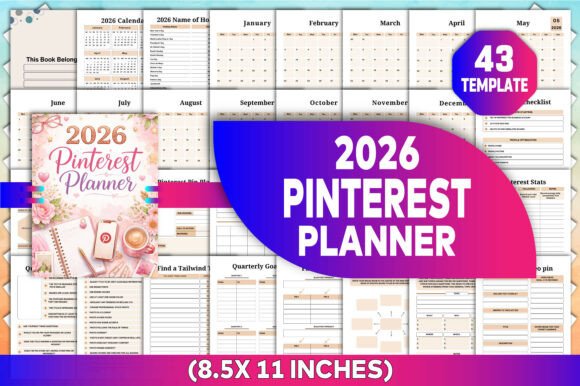
At first glance, the planner appears comprehensive, but each page serves a specific purpose in your overall planning process. The interior includes the following key components:
- 2026 Calendar & Monthly Planners (Jan–Dec): A high-level view of the year and monthly spreads for scheduling deadlines, seasonal content, and holidays.
- 2026 Holiday List: Quick reference for timely pin ideas tied to specific dates.
- Account Overview: Profile and account settings snapshot for quick audits.
- Pinterest Pin Planner (2 unique pages): Dedicated spaces to sketch out individual pin details, including images, copy, and CTAs.
- Pinterest Pin Research: Track competitor pins, viral trends, and content gaps.
- Pinterest Stats: Monitor monthly impressions, saves, clicks, and engagement.
- Quality Pin Checklist: Ensure each pin meets optimal criteria before publishing.
- Pinterest Optimization: Checklist for profile, boards, and pin settings.
- Tailwind Tribe Finder: Record communities for group sharing.
- Quarterly Goals: Break your annual plan into manageable three-month targets.
- Pin Generator: Brainstorm pin angles and formats based on topics.
- Niche Breakdown: Map out sub-niches and content pillars.
- Keyword Research: Track high-volume, low-competition keywords and phrases.
- Pinterest Video Pin: Plan video content—scripts, length, thumbnails.
- Account Checklist: Regular maintenance tasks for profile health.
- Target Audience: Define demographics, pain points, and interests.
- Daily, Weekly, Monthly Tasks: Structured to-do lists for ongoing activity.
- Goals & My Pinterest Goals: Space for overarching ambitions and progress.
- Creating Pins: Design briefs and asset tracking.
- Pin Planner & Post Ideas: Log content concepts with scheduling notes.
- Task Chart & Board Planner: Visual workflows for orchestrating multiple boards.
- To Do List & Notes: Scratch pads for miscellaneous planning.
Each section is laid out on 8.5 x 11 inch pages, ready for printing or digital use. Because the template is editable in Canva, you can rearrange, rename, or duplicate pages to suit your exact workflow.
Integrating the Planner into Your Regular Workflow
The true value of the 2026 Pinterest Planner KDP emerges when you embed it into your existing process. Think of it as a central command center that operates before, during, and after your content production cycle.
Before You Start Creating Pins
Begin your week by opening the Keyword Research and Niche Breakdown pages. Identify two or three high-potential keywords related to your next piece of content. Then move to the Quarterly Goals page to align your weekly output with broader objectives. Use the Target Audience sheet to remind yourself of the specific user problems you are solving. This upfront preparation prevents scattered efforts and ensures every pin has a clear purpose.
During Content Production
Once your blog post, product, or video is ready, turn to the Pin Generator and Creating Pins pages. Sketch out multiple pin formats—static, video, carousel, idea—and assign each a focal point. The Quality Pin Checklist becomes invaluable here: run each pin against the criteria (text size, image resolution, branding, call-to-action) before you export. For video pins, use the dedicated Pinterest Video Pin sheet to outline the hook, key message, and duration. This step reduces rework and improves consistency across your account.
After Publishing
After pins go live, the planner shifts to a tracking and optimization tool. Fill in the Pinterest Stats page at the end of each month. Compare actual performance against the goals you set in My Pinterest Goals. If certain pins underperformed, return to the Pinterest Pin Research page to analyze what worked for competitors. Use the Account Checklist to verify that your profile is fully optimized—bio, boards, rich pins—and schedule a monthly audit using the Pinterest Optimization checklist.
Customizing with Canva Templates – Tailoring the Planner to Your Needs
One of the greatest strengths of this KDP interior is its flexibility. You receive an editable Canva template, meaning you can modify text, colors, fonts, and layout elements without any design software beyond a browser. This is especially valuable for KDP publishers who want to offer variations of the planner to different audiences—for example, a version for bloggers, a version for Etsy sellers, or a version for real estate agents.
Here is a practical customization workflow:
- Rebrand the cover and interior header fonts to match your style.
- Add or remove sections using the Canva page duplication tool. If you only need the monthly planner and pin research pages, delete the rest.
- Adjust the language from generic prompts to niche-specific questions. For example, change “Find a Tailwind Tribe” to “Find a Beauty Tribe” if you are in the beauty niche.
- Export in multiple formats – PDF for KDP print, PNG for digital planners on Etsy, or JPG for low-res previews.
The high-resolution files (PDF, JPG, PNG) ensure crisp printing at 8.5x11 inches, which is the standard US Letter size. No resizing or scaling issues when you upload to Amazon KDP.
Practical Implementation Tips for KDP Publishers and Creators
Whether you are using this planner personally or selling it as a product, these tips will help you get the most out of the 2026 Pinterest Planner KDP:
- Start with the Account Checklist and Pinterest Optimization pages. Before planning any content, ensure your foundation is solid. An optimized profile improves the effectiveness of every pin you schedule.
- Use the Quality Pin Checklist as a pre-flight checklist. Before you upload a pin to Pinterest (or schedule it via Tailwind), physically check off each item. Over time, this habit becomes automatic and your pin quality will increase.
- Combine the Keyword Research page with the Pin Generator. Write down your target keyword at the top of the generator, then brainstorm 5-10 pin angles around that one keyword. This ensures you create multiple pins from a single piece of content.
- Print the monthly planner and pin planner as a physical desk pad. Sometimes a tactile approach helps you see the bigger picture. Tape the monthly spread to your wall and mark publishing deadlines.
- For KDP low-content publishing, use the planner as a lead magnet. Offer a free sample (the first month and the Quality Pin Checklist) on your website to build an email list, then sell the full planner on Amazon.
How the Planner Supports Consistent Pinterest Growth
Many creators struggle with consistency because they lack a system for tracking what they have done and what needs attention. The 2026 Pinterest Planner KDP eliminates that guesswork. By maintaining a dedicated Pinterest Stats page, you can spot trends early—like a sudden spike in saves from a particular board—and double down on that content type. The Board Planner helps you avoid board neglect by rotating which boards you pin to each week.
Additionally, the Pin Planner (2 unique pages) allows you to schedule pins visually. You can block out which days you will publish static pins versus video pins, and plan around holidays mentioned in the 2026 Name of Holiday page. This proactive scheduling prevents last-minute scrambles and ensures your content aligns with seasonal demand.
If you are part of a Tailwind Tribe or group board, the Find a Tailwind Tribe log helps you manage those relationships without relying on memory. Write down the tribe rules, the number of members, and the last date you shared to each group. This keeps your group participation organized and reciprocal.
Long-Term Use and Adaptability
Because the template is editable, you are not locked into a one-size-fits-all structure. As your Pinterest strategy evolves—maybe you start focusing on video pins, or you expand into a new niche—you can update the planner accordingly. For instance, rename the Niche Breakdown page to “Content Pillars” if that terminology fits better. Or add extra pages for story pins (Idea Pins) if Pinterest shifts its algorithm.
The planner also serves as a historical record. Save your completed PDFs each month and compare year-over-year data. Next January, you can look back at your 2026 Pinterest Planner to see exactly which strategies worked and which did not. That historical perspective is invaluable for long-term growth.
For KDP publishers, this adaptability translates into product longevity. Since buyers can edit the Canva file to suit their own needs, the planner appeals to a broad demographic. A freelance writer might use it to plan client pins, while a small business owner uses it to promote products. The same interior template works for both, making it a versatile asset in your KDP catalog.
Final Thoughts
The 2026 Pinterest Planner KDP is more than a dated set of pages. It is a modular planning system that fits into your existing workflow without forcing you to adopt a new method. By combining strategic goal-setting, daily task management, and performance tracking into one editable template, it eliminates the chaos of juggling multiple tools. Whether you are publishing the planner on KDP or using it for your own Pinterest marketing, the focus remains on execution and consistency. Start with one section—perhaps the monthly planner and the quality pin checklist—and expand your use as you become comfortable. Over the course of 2026, you will build a repeatable process that turns Pinterest from a guessing game into a predictable growth channel.